Apple MacBook Air M3 VS Apple MacBook Pro M3
Apple’s fan-less workhorse vs the pro powerhouse — which Mac do you actually need?
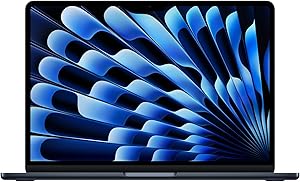

🏆
Our Pick: MacBook Air M3 — For most users, the Air delivers 90% of the Pro’s performance at $500 less with a lighter build
Full Specs Comparison
| Spec | Apple MacBook Air M3 | Apple MacBook Pro M3 |
|---|---|---|
| Chip | Apple M3 (8-core CPU) | Apple M3 (8-core CPU) |
| GPU Cores | 10-core GPU | 10-core GPU |
| RAM | 8 GB / 16 GB / 24 GB | 8 GB / 16 GB / 24 GB |
| Storage | 256 GB – 2 TB SSD | 512 GB – 2 TB SSD |
| Display | 13.6″ / 15.3″ Liquid Retina | 14.2″ Liquid Retina XDR (mini-LED) |
| Display Brightness | 500 nits sustained | 1,000 nits sustained / 1,600 peak |
| ProMotion (120 Hz) | No — 60 Hz | Yes — 24–120 Hz adaptive |
| Fans / Cooling | Fanless (passive cooling) | Active cooling (2 fans) |
| Sustained Performance | Throttles under extended load | Full performance indefinitely |
| Ports | 2× USB-C / MagSafe / 3.5mm | 2× TB4 / HDMI / SD Card / MagSafe / 3.5mm |
| Battery Life | Up to 18 hours | Up to 22 hours |
| Weight | 2.7 lb (13″) / 3.3 lb (15″) | 3.5 lb |
| Starting Price | $1,099 | $1,599 |
Apple MacBook Air M3
- ✓ $500 cheaper starting price
- ✓ Fanless — completely silent
- ✓ Lighter (2.7 lb vs 3.5 lb)
- ✓ Up to 18 hrs battery (13″ model)
- ✓ Perfect for office / everyday tasks
- ✗ Throttles under heavy sustained load
- ✗ 60 Hz display only
- ✗ No ProMotion, no mini-LED
- ✗ No HDMI or SD card slot
Apple MacBook Pro M3
- ✓ ProMotion 120 Hz mini-LED XDR display
- ✓ Active cooling = sustained max performance
- ✓ More ports (HDMI, SD card, 3 Thunderbolt)
- ✓ Up to 22 hrs battery
- ✓ Better for video editing, Xcode, 3D renders
- ✗ $500 more expensive
- ✗ Heavier at 3.5 lb
- ✗ Overkill for casual users
Final Verdict
The MacBook Air M3 is the right laptop for 90% of people — it handles email, web, Office, Zoom, even light photo/video editing, all silently and for 18 hours. At $1,099, it’s an incredible value. The MacBook Pro M3 is worth the $500 premium if you regularly do sustained heavy work: compiling code, exporting 4K video, running local AI models, or need the ProMotion display and extra ports. Don’t overpay for Pro if you’re not using it.